BTEC Tech Award July Update
With results days now in sight, this is a key moment to get organised and feel prepared for what August will bring. In this update, you will find clear guidance, important reminders and practical support to help you navigate results days with confidence.
Accessing Moderators Reports

Step-by-step guidance about how to access your initial moderator report is available on our website.
Accessing & Downloading Moderator Reports
Ensure you have downloaded the correct report for the series
When accessing your initial moderator report, double check you have selected June 2026 from the session drop-down list.
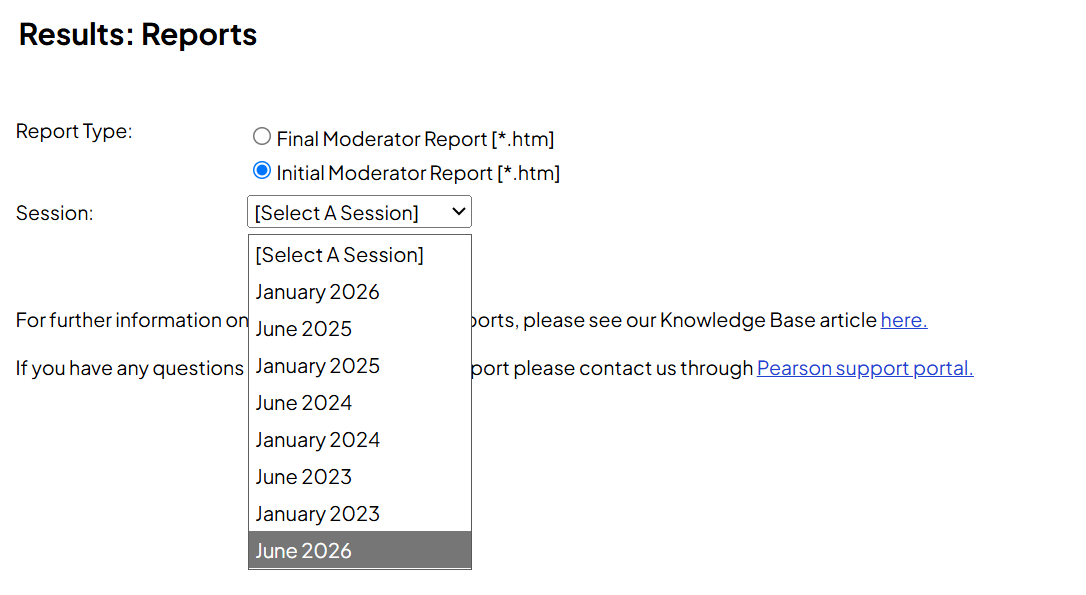
The initial moderator report will not include the session information when it is downloaded so it’s important to ensure that you have the correct feedback from the moderator.
Important that we get your feedback
Our Vocational Qualification Exam Feedback Survey for the May/June 2026 exam series are now open, and we'd really value your feedback.
The feedback you give is shared directly with our senior examiners and subject teams here at Pearson so that we can understand what's working well and where we can make improvements for future series.
Please fill out one form for each qualification you’d like to feedback on - the survey should take no more than five minutes to complete.
Accessing and analysing your results
Preparing for Summer Results
Multi-Factor Authentication for Edexcel Online

To avoid any unnecessary delay in accessing your results and supporting learners, we are asking you to log on to one of the following platforms, ensuring you have a valid password and can authenticate using the MFA app.
- Edexcel Online (EOL)
- ResultsPlus
- Exam Viewer
The sooner you do this and ensure that your access is working the better.
Secure callbacks: Some issues, such as the need for an MFA device reset, requires us to complete a secure callback on the number we have on file. This usually means speaking to your centre reception first.
We have adapted our secure callback process to allow the use of a personal mobile number. If any secure callbacks are required during the summer holidays while you are not in centre, we are still able to do this quickly and securely.
Further Support: We appreciate that you may have questions about multi factor authentication..
Accessing Pearson Services Using Multi-Factor Authentication (MFA)

Results days: Key dates
| Qualification |
Exam session | Results to centres | Results to students |
|---|---|---|---|
| Tech Award 2022 | Summer 26 | 14/08/2026* | 20/08/2026 |
* The 'Results to centres' date is embargoed, giving you more time to make sure everything’s in order before learners see their results.
View the key date schedule documents for all relevant dates
Grade Boundaries
You can access Summer 2026 grade boundaries by component by using the Raw Mark to UMS convertor tool called 'BTEC marks convertor support' found on the website.
Using this tool you can access all raw to UMS conversions for all components in the Tech Award 2022 qualification.
Once you know each component UMS mark you can add these together to calculate the overall qualification score using the grade table from the specification. See below.
| Qualification Grade | L2D* | L2D | L2M | L2P | L1D | L1M | L1P |
| Max UMS = 300 | 270 | 240 | 210 | 180 | 150 | 120 | 90 |
Learners who do not achieve the standard required for a Level 1 Pass grade will receive a uniform mark in the range 0–89.
The Level 2 Distinction* grade at qualification level will be awarded only if a learner has achieved a Level 2 Distinction in each component and the minimum number of uniform marks for the Level 2 Distinction* at qualification level.
Availability of Summer 2026 Question Papers, Mark Schemes and Examiner Reports
Exam materials from the Summer 2026 exam series will be made available on our website (secure download) on the following dates:
| Assessment materials | Date of availability on website |
|---|---|
| Question Papers | Available |
| Mark Schemes | Results Day |
| PSA Examiner Reports | Results Day |
| Examiner Reports | Results Day |
ResultsPlus - our online results analysis tool
ResultsPlus is our free online results analysis tool, that gives you a detailed breakdown of your students’ performance in Pearson Edexcel exams.
It provides you with detailed analysis available of your students’ performance compared to national and other schools.
You can access ResultsPlus using your Edexcel Online username and password if your account profile has ResultsPlus access granted by your Exams Officer.
Details for use of Results Plus for the Tech Award 2022 can be found in the support guide
Access to Scripts - Component 3
You can use our free Access to Scripts service to view your candidates’ marked exam scripts online or download as a PDF. It is available from results day until the 11 December 2026.
Providing a rich source of information, you can use this service to help make decisions about requesting a review of marking, but it can also help inform future teaching and learning and gives insights and visibility that performance data alone cannot provide.
Note, you will need 'Exam viewer' in your Edexcel Online profile if you want to download candidate scripts from results day. Please ask your Exams Officer if you need this adding to your profile.
Useful background content
There’s an important change to how you submit marks and student work for BTEC Tech Awards for internally assessed and externally moderated work. .
What changed?
You’ll need to submit your centre marks before we release the list of students selected for the moderation sample.
Once you’ve made your entries, submit your centre marks through Edexcel Online. Once your centre marks are submitted, your moderation sample will be available in Learner Work Transfer from the next day, and you can upload student work for moderation straight away.
What you need to do
The deadline for submitting the moderation sample remains 15 May. Please submit your marks as soon as you’re able to rather than waiting until the deadline, allowing enough time for you to know who is selected in teh sample so you can then upload your moderation sample.
We’ll be asking for a larger sample size when moderating internally assessed work for BTEC Tech Award qualifications.
By asking for a larger sample upfront, we aim to make the process smoother and reduce the likelihood of additional requests later on. This will not affect the way in which moderators review the sample, and they will only look at additional samples of work where needed.
| Cohort Size | Sample size * |
|---|---|
| 1 - 15 | All |
| 16 - 100 | 15 |
| 101 - 200 | 20 |
| >200 | 25 |
* You must also include the highest and lowest (non-zero) marked students, if they have not already been selected in your sample.
The Tech Award 2022 Key dates are a vital reference please find the link below.

This knowledge base resource is an excellent repository of knowledge that is curated by customer service experts. The information is far reaching and detailed, while being easy to navigate.
Whether you want Registration and Entry details or details about the use of Edexcel Online (EOL) for submission of raw marks it can all be found here
Tech Award 2022 - Support Index
After you have submitted marks and the requested samples of learner work for Pearson-Set Assignments, you can expect to receive the initial Moderator Feedback Report. This report will provide valuable information about the accuracy of your marking and offer guidance on areas where you may choose to amend marks (if necessary). Amending marks is optional.
Learners are required to take the external assessment at the end of their qualification (the series in which the learner certificates). This means that learners must sit internal component assessments either prior to or in the same series as the external assessment to fulfil this terminal rule. If a learner chooses to retake an internal assessment in a series after they sat the terminal external assessment, they will also need to re-sit the external component to satisfy the terminal rule.
Learners are allowed one retake of each internal component, and one re-sit of the external assessment within the programme.
To help you understand the terminal rule, we’ve created a new scenario based quick quide that you can use to help you plan your learners path to certification.
Distinction * qualification grade needs all component results to be Distinction.
The UMS total will tell you what qualification outcome the student has achieved, except that for a D* certification all three components also need to be at Distinction. So it is possible for a student to have 270 UMS and not achieve an overall D*.
From the specification section 8:
The Level 2 Distinction* grade at qualification level will be awarded only if a learner has achieved a Level 2 Distinction in each component and the minimum number of uniform marks for the Level 2 Distinction* at qualification level.




Learners can retake internally assessed components once during their course.
If learners are retaking internally assessed components, they must respond to the new PSA released for that series. Learners are permitted to adapt work from their initial sitting where it is appropriate. They can use the full allocated time, including monitored preparation where applicable, and if they choose to adapt work from their initial sitting, they will need to repurpose, build upon and/or amend their work to meet the new PSA. Learners should not be overly guided on how to improve their work, and if assistance is provided, this should be documented and considered during assessment.
For further information, centres should follow the JCQ Guidance with particular attention paid to sections 2 and 17.
If a learner chooses to retake an internal assessment in a series after they sat the terminal external assessment, they will also need to resit the external component to satisfy the terminal rule. Learners are allowed one resit of the external assessment within the programme.


You will submit certification claims for the new BTEC Tech Awards during the series in which learners are sitting their terminal external assessment. You will do this using the cash-in code for the qualification, which you can find in our Information Manual.
You can make certification claims during the normal entry window for the assessment series. If you have a learner who sits their terminal assessment in January and is happy with their result, you will be able to submit a late claim following the release of January results. However, if a learner is not happy with their results and intends to resit in the May/June series, you may choose to delay claiming until making their resit entry.
We have revised the FAQs to include more detail about Claiming certification please review this material carefully

The new VQ Learner Tracker, is a new tool you can use to identify where cash-ins are missing and help you to manage your BTEC Tech Award cohort.
Subject advisor
Tim Brady
Computer Science and ICT Subject Advisor