A level Geography NEA Submission Summer 2026
Guidance on submitting A level Geography NEA marks and samples online, including deadlines and required materials, for Summer 2026.
Key Dates

21 February 2026: Summer 2026 entry deadline for UK A level qualifications. Once you have submitted your entries and we process them you will be able to submit your centre's coursework marks via Edexcel Online.
13 April 2026: The Learner Work Transfer portal opens for submission of moderation samples online. If your centre marks are submitted before this date, your moderation sample will be available in the Learner Work Transfer portal from 13 April, and you can upload student work for moderation straight away. If you submit your centre marks on or after 13 April, your moderation sample will appear in Learner Work Transfer within 6 hours.
15 May 2026: Final date to submit coursework samples and marks to us for Summer 2026 certification. Please note that your Exams Officer may have their own internal deadlines and you also need to take into account the requirement to inform students of their centre assessed marks.
Important change to mark and sample submission for moderated work
From this summer, there are some important changes to how you submit marks and student work for A Level Geography NEA which is internally assessed and externally moderated work.
What’s changing?
You’ll need to submit your centre marks before we release the list of students selected for the moderation sample.
Once you’ve made your entries, submit your centre marks through Edexcel Online. Learner Work Transfer opens on 13 April 2026. If your centre marks are submitted before this date, your moderation sample will be available in Learner Work Transfer from 13 April, and you can upload student work for moderation straight away.
If you submit your centre marks on or after 13 April, your moderation sample will appear in Learner Work Transfer within 6 hours.
What you need to do
The deadline for submitting the moderation sample remains 15 May.
Please submit your marks as soon as you’re able to rather than waiting until the deadline, allowing enough time for you to upload your moderation sample.
What's changing?
From June 2026, we’ll be asking you to submit a slightly larger sample size for moderation in qualifications with coursework such as A level Geography.
This change is designed to make moderation smoother and reduce the need for additional sample requests later in the year.
Why are we making this change?
We’re making this change because, from time to time, moderators need to request additional samples to complete their moderation. When these requests come later in the year, we know it can be challenging for you to manage alongside the demands of a busy series.
By asking for a slightly larger sample upfront, we aim to make the process smoother and reduce the likelihood of additional requests later on. This should help us complete moderation more efficiently, and give you and your students greater clarity and confidence in the outcomes. This process will not affect the way in which moderators currently review the sample, and they will only look at additional samples of work where needed.
| Cohort size | Sample size |
| 1-15 students | All |
| 16-100 students | 15 |
| 101-200 students | 20 |
| >200 students | 25 |
How to submit coursework marks online to Pearson
Marks should be submitted to us via Edexcel Online. You should be able to start submitting marks as soon as your entries have been submitted and processed.
For each student you should submit the raw mark out of 70. Please do not try to double the mark or convert them into a percentage or grade.
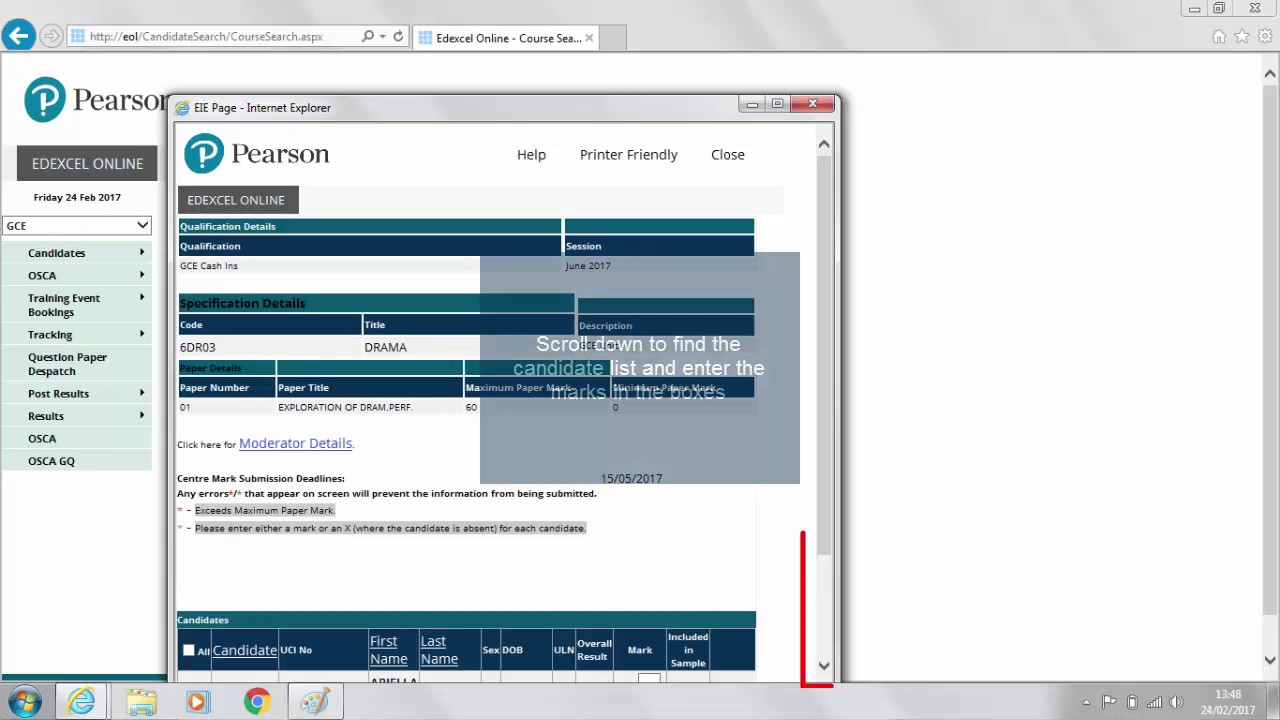
Further guidance document on submitting marks via Edexcel Online:

You may need to amend your Edexcel Online access to allow you to submit coursework marks online. To do this your Exams Officer will need to go into your Edexcel Online account and under ‘profiles’ tick the box next to ‘Coursework and Portfolio’. If they also tick the ‘Results’ box you will be able to view your E9 moderator report on results day.
After submitting marks online you should print out a copy of the marks for your own records.
If you have already submitted a mark but it needs to be amended (eg because of an administrative error), please use our Moderated Coursework Mark Amendments form with details of the student and amended point score.
To submit coursework marks on Edexcel Online and coursework samples using the Learning Work Transfer portal you need a valid Edexcel Online account linked to your centre. If you need to be set up with an Edexcel Online account you must speak to your Exams Officer – they are the only person who can set up your account.
You can log in to Edexcel Online to check your account details via this link:

If you've forgotten your Edexcel Online password you can generate a new one. Your username is usually your email address.
You are now required to authenticate when logging into Edexcel Online and other services using the Pearson Authenticator App, which is available to download from the App Store or Google Play Store.
How to submit coursework samples online to Pearson
All coursework moderation samples must be submitted to us electronically using the Learner Work Transfer (LWT) portal.
We have created a guidance document for teachers to provide more information and guidance on the process. The document outlines the different ways in which you can submit samples online.
How to use the Learner Work Transfer portal
This video shows you how to log in and navigate the Learner Work Transfer portal:
You will not be able to access the LWT portal until it opens on 13 April 2026.
You will not be able to see your requested A level Geography sample on the LWT portal until you have submitted your centre marks via Edexcel Online.
When you log in to the LWT portal you will see a choice of Standards Verification (BTEC) and Examination/Moderation (GCSE and A levels). A level Geography coursework is internally assessed so you need to select 'Examination/Moderation' then ‘Moderation’.
If you are prompted to select an exam series you should select 'June 2026' for A level Geography.
If you are unable to use the LWT portal once logged in to Edexcel Online please make sure that a) your Edexcel Online account is linked to your centre and b) you have ‘basic access’ selected in your Edexcel Online profile – your exams officer can help you with this.
If you are unable to see the LWT portal in the left-hand menu when logged in to Edexcel Online please make sure you don't have a qualification selected (such as GCE) in the top menu option.
It is very important that you decide who in your centre will be responsible for submitting the coursework samples to us online. You also need to decide which format you will use to submit coursework samples to us online. There are three main options for the format of samples – more detailed guidance for each option is provided in the guidance document above.
Teachers may upload the following file types:
- read-only word documents
- PDFs
It is also possible to use zip files however these should not be used unless you have a file type that is not supported. You should not attempt to zip files together - upload files individually when submitting via LWT.
When you create a file for each sampled student then each file should use the following naming convention:
[centre #]_[candidate number #]_[surname]_[first letter of first name]
For example, Jane Smith with candidate number 7890 at centre 12345 would have work in a folder titled: 12345_7890_Smith_J
If you are uploading more than one document for a student, please adopt the following naming approach:
- 12345_7890_Smith_S_Coursework (for the coursework itself)
- 12345_7890_Smith_S_Marking Sheet (for the Independent Investigation Marking Sheet)
- 12345_7890_Smith_S_Independent Investigation (for the Independent Investigation Form)
Each file should be uploaded individually within the LWT portal. You can upload multiple files at once.
How to identify the sample of work that needs to be submitted online for moderation
You will be able to see the names of the students required for sampling when you log in to the Learner Work Transfer Portal when it opens on 13 April 2026. Remember that you will only be able to see the list of students if you have submitted your marks via Edexcel Online.
You will also be able to log in to Edexcel Online to see the list of students required in the sample by going to the coursework mark submission screen where there will be a tick next to the candidates' names that need to be submitted for moderation. This will only be available once the centre marks have been submitted.
If, for some reason, you're unable to submit the work for a particular student, you should submit the work of an equivalent student with a similar mark.
The number of students required in the sample will depend on the number of entries you have for A level Geography. This summer we are asking you to submit a slightly larger sample size for moderation in qualifications with coursework such as A level Geography. This change is designed to make moderation smoother and reduce the need for additional sample requests later in the year. The sample will automatically include the work of the highest and lowest scoring students in your centre.
| Cohort size | Sample size |
| 1-15 students | All |
| 16-100 students | 15 |
| 101-200 students | 20 |
| >200 students | 25 |
How to deal with missing work or withdrawn candidates
If you are required to submit a coursework sample for a student whose work is missing then please submit the work of a different student of similar ability via LWT.
If you have withdrawn the entry of a student and they are still showing on the Learner Work Transfer portal then please use the ‘status’ drop down to mark the learner as absent on LWT. If they are part of the requested sample please submit another student’s work of a similar ability.
If you have used our A level Geography coursework advisory service you should send the moderator a copy of the feedback proforma(s) you received. Please note this is not a compulsory service so only send this if you used the service.
JCQ notice to centres – informing candidates of their centre assessed marks
Centres have, for many years, been required to have a written internal appeals procedure relating to internal assessment decisions. As part of this procedure, candidates must be told the mark given by their centre for a centre-assessed component/unit. This applies to A level Geography NEA
Subject advisor
Jon Wolton
Geography